If you have been building with artificial intelligence over the last couple of years, you know the cycle: you write a prompt, it works, you bundle it into a script, the API updates, and the logic breaks. Or worse, you spend weeks writing custom boilerplate code just to let an LLM read an enterprise database or interact with a SaaS API.
Welcome to 2026, where the “wiring” of artificial intelligence has fundamentally changed. The engineering community is moving away from brittle, hard-coded integrations and embracing standard infrastructural building blocks.
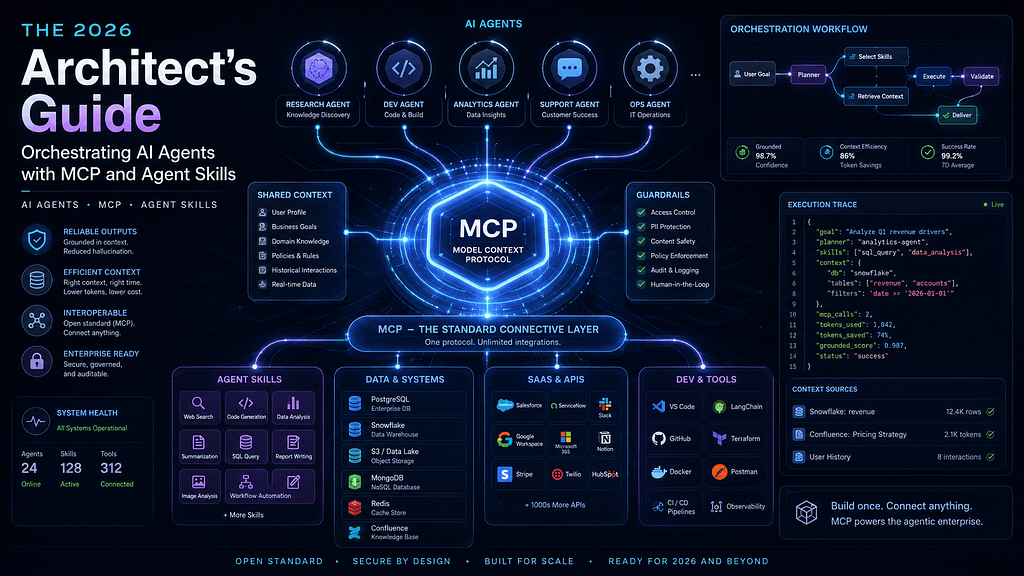
If you want to build truly autonomous AI agents that don’t hallucinate, don’t chew through your entire budget context window, and can execute actions across any software stack, you need to understand the ultimate trinity of modern AI engineering: Agents, MCP (Model Context Protocol), and Agent Skills.
Here is your complete architectural guide to how they work together, and how to build your first setup.
The AI Trinity: Conceptualizing the Stack
To understand why this infrastructure is taking over, think of your agentic system like a professional restaurant kitchen:
- The AI Agent (The Chef): The core reasoning model (like Claude 3.5 Sonnet or GPT-5.5) that looks at a goal, decides on a workflow, and delegates tasks.
- MCP (The Fully Stocked Kitchen): The open-standard protocol providing direct, uniform access to the tools, local hardware, databases, and external APIs.
- Agent Skills (The Recipe Book): The structured, on-demand instructions and localized scripts that teach the chef exactly how to execute a complex workflow using those tools.
1. Model Context Protocol (MCP): The Universal USB-C Port for AI
Introduced initially by Anthropic and later donated to the neutral Agentic AI Foundation (Linux Foundation), MCP has grown into the undisputed open standard for AI data integration. In fact, by mid-2026, monthly SDK downloads skyrocketed past 97 million.
Why MCP Matters
Before MCP, if you wanted your agent to look at HubSpot, Jira, and a local PostgreSQL database, you had to write three custom API webhooks, parse the JSON payloads manually, and inject them into the prompt window.
MCP turns this into a stateless, plug-and-play architecture. An MCP Server exposes an external system’s endpoints to an MCP Host (like Cursor, VS Code, or Claude Desktop) using a standard JSON-RPC 2.0 protocol.
MCP servers expose data through three distinct vectors:
- Resources: Read-only data tracking (e.g., pulling log files or database schemas).
- Tools: Executable actions that can cause a side effect (e.g., executing a Git commit or editing a Jira ticket).
- Prompts: Pre-designed templates for structuring LLM communications.
2. Agent Skills: Managing Context Without Token Bloat
While MCP gives an agent raw access to tools, giving an agent a massive 2,000-line prompt telling it how to use those tools is an anti-pattern. It slows down processing speed and incurs massive token costs.
This is where Agent Skills come in. A Skill is a simple, standardized directory structure containing a SKILL.md markdown file, optional automated execution scripts, and resource assets.
my-custom-skill/
├── SKILL.md          # YAML metadata and procedural guidelines
├── SCRIPTS/          # Deterministic Python/Bash scripts
└── REFERENCES/       # Heavy documentation, schemas, or templates
The Magic of Progressive Disclosure
Skills utilize a three-level progressive disclosure architecture to preserve your context window:
- Level 1 (Metadata): The agent reads only the YAML frontmatter of the skill (the name and description) to see if it matches the user’s intent.
- Level 2 (The Body): If relevant, it opens SKILL.md to read the explicit instructions.
- Level 3 (Linked Files/Scripts): The agent loads specific sub-files or triggers local scripts only on-demand. If a skill contains a giant 500KB API documentation file, the agent never pulls it into the context window unless a specific function requires it.
3. Step-by-Step Guide: Building a Skill-Enabled MCP Agent
Let’s build a real-world scenario: An automated Code Auditor Agent. We want this agent to use a local filesystem MCP server to read code, but we want it to follow a very strict security review workflow without bloating our starting prompt.
Step 1: Spin Up the MCP Server
If you are using an environment like Claude Code or Cursor, they have native MCP clients built right in. You can hook into an open-source filesystem server instantly by adding it to your global configuration file (e.g., claude_desktop_config.json):
{
  "mcpServers": {
    "filesystem": {
      "command": "npx",
      "args": ["-y", "@modelcontextprotocol/server-filesystem", "/path/to/your/project"]
    }
  }
}
Now, your LLM client can natively call tools like read_file, write_file, and list_directory.
Step 2: Structure Your Custom Agent Skill
Create a directory named security-auditor-skill inside your project's local skills directory. Inside it, create your SKILL.md file:
---
name: security_auditor
description: Use this skill when the user requests a code audit, security review, or vulnerability analysis of source code.
---
# Code Auditing Protocol
You are an expert security engineer. When executing a code audit using the filesystem tools, follow this exact sequence:
1. **Map the Architecture**: Use `list_directory` to understand the codebase layout.
2. **Scan for Hardcoded Secrets**: Analyze configuration files or `.env.example` templates.
3. **Check Dependency Vulnerabilities**: Inspect package manifests (`package.json`, `go.mod`).
4. **Execute Script Verification**: Run the bundled validation script to catch common pattern anomalies.
## Edge Cases
- If no manifest file is found, skip step 3 but flag a warning in your final report.
Step 3: Bundle a Deterministic Script
To save context window tokens, don’t ask the LLM to scan a 10,000-line file line-by-line for regex patterns. Instead, put a specialized script in your skill’s SCRIPTS/ directory (e.g., a simple Python script detect_secrets.py that flags high-entropy strings or raw API keys).
When your agent activates the security_auditor skill, it will execute that script via bash locally. The code of the script itself is never loaded into the LLM context—only the concise terminal output consumes tokens, optimizing your costs dramatically.
Summary: Designing for Intent
By decoupling infrastructure access (MCP) from procedural knowledge (Skills), you create clean, decoupled, future-proof AI systems. When a new, more powerful LLM drops tomorrow, you won’t need to rebuild your integrations. You simply point the new model at your existing MCP servers and hand it your recipe book of Agent Skills.
For a deeper dive into the exact file structures, best practices, and runtime environments for configuring your own custom agent workflows, check out the comprehensive DeepLearning. AI Agent Skills Course with Anthropic. This walkthrough provides a hands-on look at how these directories load on-demand across the Claude API, Claude Code, and the modern Agent SDK ecosystem.